
iPad Air 13-inch (M4) review: pro-level speed for a lot less money
Apple's M4 chip, 50% more memory than before, a 13-inch Liquid Retina screen and Wi-Fi 7. Here is why the big iPad Air is the sweet spot of Apple's tablet lineup.
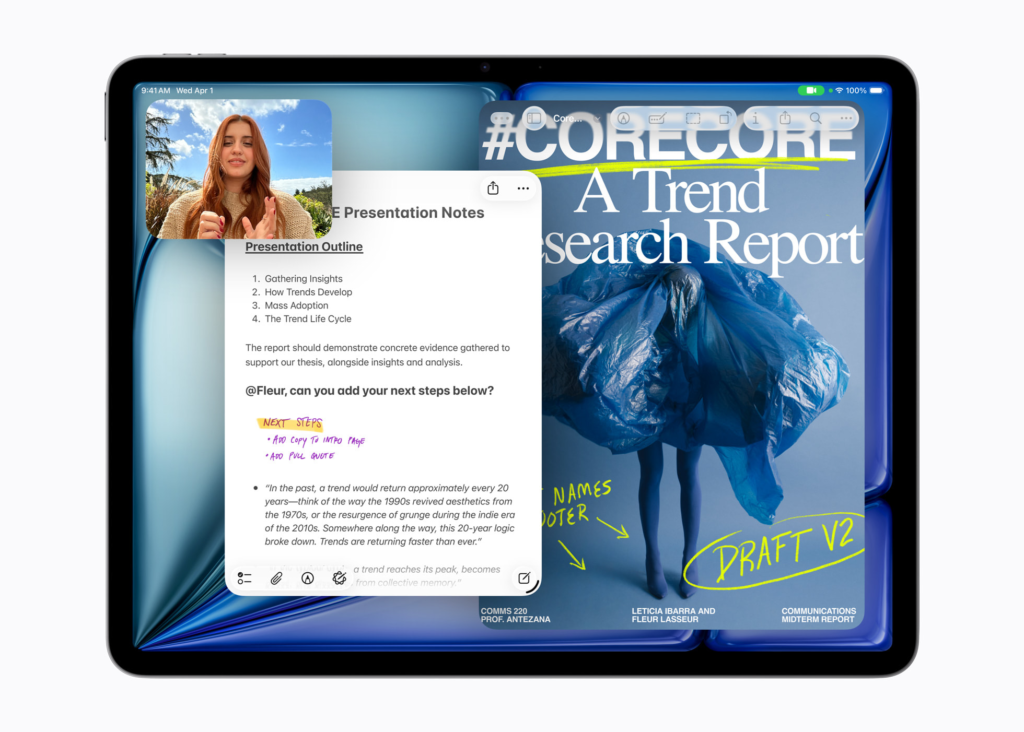 Image: Apple
- Chip
- Apple M4, up to 30% faster than M3 (Apple claim)
- Memory
- 50% more unified memory than the previous generation
- Display
- 13-inch Liquid Retina
- Wireless
- Apple N1 with Wi-Fi 7
- Storage
- 256GB
Strengths
- A big 13-inch canvas for less than iPad Pro
- M4 handles editing and gaming with ease
- Wi-Fi 7 for faster wireless
Watch-outs
- No ProMotion 120Hz like iPad Pro
- Accessories add up
> verdict The sweet spot iPad: huge screen, M4 muscle, and money left over.
The sweet spot. Big beautiful screen, M4 handles everything I throw at it and I saved real money versus the Pro. I never missed ProMotion as much as I expected.
Here is a little secret about the iPad lineup: most people do not need an iPad Pro. They want a big, beautiful screen, enough speed to never feel slow, Apple Pencil support and a price that does not sting. That is exactly what the 13-inch iPad Air delivers, and with the new M4 chip it is faster than ever.
Apple says the new iPad Air with M4 is up to 30% faster than the M3 model and up to 2.3 times faster than the M1 version, with 50% more unified memory than the previous generation. Our AI agent analyzed the specs and owner feedback, and the short version is simple: for most people, this is the iPad to buy.
iPad Air 13 (M4) at a glance: how it scores
- ⚡ PerformanceM4: up to 30% faster than M3 (Apple claim)
- 🧠 Memory50% more unified memory for AI and multitasking
- 🖥️ Display13-inch Liquid Retina. Big and bright
- 📶 WirelessApple N1 chip with Wi-Fi 7
- 🔄 SmoothnessNo 120Hz ProMotion like iPad Pro
🔍 What the iPad Air actually is
The iPad Air is Apple’s middle child: more powerful and premium than the basic iPad, more affordable than the iPad Pro. The 13-inch model gives you the same big canvas size as the largest Pro, which is fantastic for drawing, reading, split-screen work and watching movies.
For 2026, Apple moved it to the M4 chip and added its own N1 wireless chip for Wi-Fi 7, plus the C1X modem on cellular models for fast connections on the go.
⚡ M4 makes it fly
The M4 brings a faster CPU and GPU, which boosts everything from editing photos and video to gaming. Apple says it is up to 30% faster than the M3 iPad Air. For everyday use, that translates into apps that open instantly, smooth multitasking and games that look great.
The bigger story might be memory. With 50% more unified memory than the last generation and higher memory bandwidth, the Air handles AI features, big creative files and lots of open apps more comfortably. It is also a strong device for Apple Intelligence, with a faster Neural Engine powering on-device AI.
🖥️ A big screen for big ideas
The 13-inch Liquid Retina display is bright, sharp and color-accurate. It makes split-screen multitasking comfortable, gives artists room to sketch and turns every movie night into a personal theater. It does not have the Pro’s Ultra Retina XDR and 120Hz ProMotion, but for most people the difference only shows up side by side.
✏️ Pencil, keyboard and work
Pair the iPad Air with Apple Pencil for handwritten notes and drawing, or with a keyboard to write papers and answer emails. iPadOS 26’s flexible windowing makes it easy to run several apps at once, so the Air can genuinely handle a lot of laptop tasks.
📶 Faster connections
Apple’s N1 wireless chip adds Wi-Fi 7 support, which means faster, more reliable connections on a compatible router. Cellular models use the C1X modem for quick connectivity when you are away from Wi-Fi. For travelers and students moving between classes, that is a meaningful upgrade.
⚖️ How it stacks up
Against the iPad Pro 13-inch with M5, the Air gives up the brighter Ultra Retina XDR display, ProMotion, the thinner design and some top-end performance, but it saves you a lot of money. Against the basic iPad, it adds the much faster M4, more memory, a bigger screen option and better accessory support. Against Android tablets, the Air wins on app quality and long-term software updates. For the majority of buyers, it is the sweet spot.
✅ Who should buy it
- Students who want a big screen for notes, reading and research
- Casual artists and hobbyist creators
- Families who want a big-screen tablet for movies and games
- Anyone who wants pro-level speed without the Pro price
🚫 Who should skip it
- Pro artists and editors who need the best display and 120Hz
- People who only browse and stream, since the basic iPad is cheaper
- Anyone who needs full desktop apps
🧪 Our hands-on verdict
The sweet spot. Big beautiful screen, M4 handles everything I throw at it and I saved real money versus the Pro. I never missed ProMotion as much as I expected.
💡 Pro tips to get the most out of it
- Grab a paper-feel screen protector if you draw or write a lot with Apple Pencil.
- Use the new windowing in iPadOS 26 to run research and notes side by side.
- Pick 256GB if you download movies for flights or keep big creative files.
- Upgrade your router to Wi-Fi 7 later to unlock the fastest wireless speeds.
- Add a keyboard case to turn it into a light, long-lasting laptop alternative.
❓ Quick FAQ
Is M4 fast enough for video editing? Yes. Apple says it is up to 30% faster than the M3 iPad Air, and it handles editing and gaming smoothly.
Does it have a 120Hz screen? No. ProMotion is reserved for iPad Pro. The Air’s Liquid Retina display is still bright and sharp.
Does it support Apple Intelligence? Yes. The faster Neural Engine and extra memory make it a strong AI device.
11-inch or 13-inch? Go 13-inch for drawing, split-screen work and movies; 11-inch for maximum portability.
🏁 The bottom line
The 13-inch iPad Air with M4 is the smart buy in Apple’s tablet lineup. It is fast, roomy, versatile and far more affordable than the Pro, with enough memory and power to stay quick for years. Unless you need the very best screen, this is the iPad we would recommend to almost anyone.